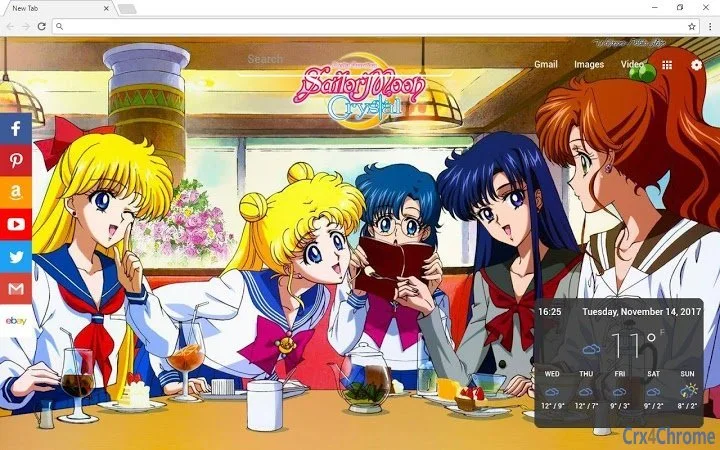

Sailor Moon New Tab Experience
Overview
The Sailor Moon browser extension transforms the default new tab page into a visually engaging and functionally enhanced digital workspace. Designed for users seeking both aesthetic appeal and practical tools, it integrates high-resolution 4K wallpapers with a suite of productivity utilities directly into the browser interface. The primary purpose of this tool is to elevate the browsing experience by combining customizable visuals with everyday digital aids.
Target users include casual internet users, fans of the Sailor Moon franchise, and individuals looking to personalize their browsing environment. It addresses common pain points such as repetitive new tab screens and lack of quick access to essential tools like weather, clocks, and task management. By offering a dynamic theme system and modular features, the extension allows users to tailor their new tab to suit personal preferences and workflow needs.
Real-world usage scenarios include using the digital clock for time tracking, checking weekly weather forecasts during morning routines, managing to-do lists while researching, or setting timers during focused browsing sessions. The ability to hide or show specific elements ensures that users can maintain a clean, distraction-free interface when needed.
Key Features & Capabilities
- Dynamic 4K Wallpapers – Each new tab opens with a fresh, high-quality image from the Sailor Moon universe, providing a visually immersive experience. Users can enjoy a rotating selection of themed artwork without manual intervention.
- Weekly Weather Forecast – Displays upcoming weather conditions with the option to switch between Fahrenheit and Celsius, helping users plan their day with real-time climate data.
- Quick Access Links – Pre-configured shortcuts to popular platforms including Facebook, Amazon, YouTube, Twitter, and Gmail, enabling faster navigation without typing URLs.
- Local Digital Clock – A persistent clock showing the current time, useful for time-sensitive tasks or general awareness.
- Integrated Timer – Allows users to set countdowns while browsing, ideal for Pomodoro-style work sessions or tracking time on specific tasks.
- To-Do List – A simple task manager that helps users organize priorities and stay focused during online activities.
- Customizable Layout – All features can be toggled on or off, allowing users to build a personalized new tab interface based on their current needs.
These features collectively support productivity and visual satisfaction. For example, a student might use the timer and to-do list while studying, while a social media enthusiast may rely on the quick links and wallpaper rotation for daily engagement.
User Interface, Workflow & Performance
The user interface is minimalistic and centered around the new tab page, with a clean layout that prioritizes readability and visual appeal. Navigation is intuitive, relying on simple toggle switches to enable or disable features. The design avoids clutter, ensuring that essential tools remain accessible without overwhelming the user.
Workflow efficiency is enhanced by the modular nature of the extension. Users can activate only the tools they need at any given time, reducing cognitive load. The interface responds quickly to changes, with no noticeable lag when toggling elements on or off.
Performance observations are based on general software behavior patterns. The developer did not specify resource usage details. However, given the extension’s small size of 1.5 MB, it is likely optimized for low memory and CPU impact. Stability is expected to be consistent with standard browser extensions, though real-world behavior may vary depending on the user’s system and browser configuration.
Compatibility & System Requirements
The extension is compatible with Windows, Mac, and Linux operating systems, making it accessible to a broad audience. It is designed for use within modern web browsers, particularly Chrome, as implied by its functionality.
Installation size is listed at 1.5 MB, indicating a lightweight footprint. The developer did not specify exact system requirements beyond the supported platforms. No additional hardware specifications were provided.
Compatibility information was partially provided. Users should ensure their browser is up to date to avoid potential issues. The extension’s functionality may depend on browser-specific APIs, which are standard across supported platforms.
Pros and Cons
Pros
- Visually striking 4K wallpapers enhance browsing experience
- Multiple productivity tools integrated into a single interface
- Highly customizable layout with toggleable features
- Lightweight installation at just 1.5 MB
- Free to use with no hidden costs
Cons
- Exact performance impact on CPU and RAM not disclosed
- Customization options limited to visibility, not layout rearrangement
- Dependent on browser compatibility and updates
- Limited to Chrome-based browsers unless otherwise specified
FAQ Section
Is the Sailor Moon extension compatible with all browsers?
The extension is designed for Chrome-based browsers. Compatibility with other browsers has not been confirmed.
Is the software safe to install?
The extension is free and available through official channels. It does not require administrative privileges or sensitive permissions. Users are advised to install only from trusted sources.
How often does the wallpaper change?
The extension features a rotating selection of 4K wallpapers, with a new image displayed each time a new tab is opened.
Can I update the extension automatically?
Automatic updates are managed by the browser’s extension system. Users should ensure their browser is updated to receive the latest version.
Does the extension work offline?
Basic features like the clock and to-do list function offline. Weather data requires an internet connection to refresh.
Final Thoughts + CTA
The Sailor Moon new tab extension delivers a compelling blend of visual delight and practical utility. Its customizable tools, elegant design, and free access make it an appealing choice for users who want to enhance their daily browsing routine. While performance details are not fully disclosed, the lightweight nature and modular layout suggest efficient operation across various systems.
It is particularly well-suited for fans of the franchise, digital organizers, and anyone looking to reduce browser distractions while maintaining access to essential tools. The ability to tailor the interface ensures long-term usability and user satisfaction.
Download Sailor Moon New Tab Experience now.







